Buy from a creator's store
When Checkout is available, open the product from the creator's store and review its contents, price and refund policy. Use the purchase button, enter an email you can access, and review the terms before continuing to Stripe Checkout. After paying, wait for payment confirmation and file delivery. Do not pay again if the status is still preparing.
Use the email from your purchase
When paid Checkout is available and a payment is confirmed, the delivery email links to your files. Check the inbox and spam folder for the email used at checkout. A Checkout return page alone does not prove payment or delivery.
Recover a missing link
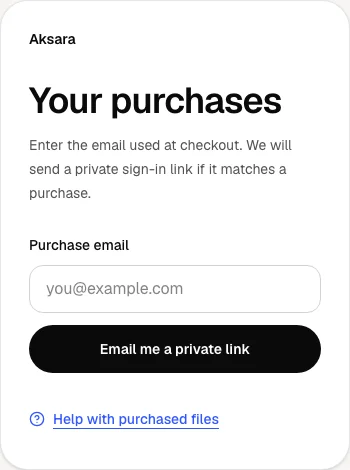
Open Your purchases and enter the exact email used at checkout. Choose Email me a private link. For privacy, the response does not reveal whether that email has an order. If a matching purchase exists, follow the link in your inbox.
Download from the access page
Open the purchased item and choose its file download. Download links expire; return to the access page for a fresh link. Do not share private access links. The file version recorded with your purchase remains the one you bought.
Ask for help if access fails
If a file is missing, corrupt or does not match its description, use the seller support option on the access page. If you cannot reach that page, contact Aksara support with your order reference and checkout email. Never send card details or a private access link.